파이썬 3.8 EOL... 우리 이제 버전 올려야 해요🥹 - Flask 프로젝트의 파이썬 버전 올리기
python 3.8 빠이빠이
들어가는 글🙋♀️
서비스 개발에 있어 새로운 기능을 추가하는 일만큼이나 중요한 것이 바로 유지 보수의 과정이다. 유지 보수는 코드의 안정성과 품질을 유지하는 것에서 나아가, 사용 중인 프로그래밍 언어와 패키지의 버전을 체계적으로 관리하는 작업을 포함한다. 특히, 개발 생태계가 지속적으로 발전하고 있는 현대 소프트웨어 환경에서는 이러한 관리가 프로젝트의 안정성을 좌우하는 중요한 요소가 된다.
본 글에서는 프로젝트를 구현에 사용한 파이썬 버전을 업그레이드하기 위한 내용을 담았다. 이는 더 이상 지원되지 않는 파이썬 3.8 버전으로 인한 보안 취약점을 제거하고, 이를 통해 향후 패키지 호환성 문제를 줄이고 장기적인 유지 보수를 용이하게 하는 데에 목적이 있었다.
파이썬 백엔드 엔지니어로서 해당 작업을 진행하며 어떤 의사결정을 내렸는지, 그리고 이를 단계별로 어떻게 실행했는지를 공유한다. 이 과정에서 직면했던 실무적인 문제들과 해결 방안을 중심으로, 유사한 작업을 계획하고 있는 개발자들에게 실질적인 도움을 제공할 수 있기를 기대한다.
파이썬 3.8... 지원이 끝났다...
사내에서 진행하고 있는 Flask 프레임워크를 이용한 프로젝트는 파이썬 3.8인 채로 개발을 진행하고 있었다. 꽤 오래 전에 3.6에서 3.8버전으로 업그레이드 했었고, 지금 파이썬 3.13가 release 되었으니 아무래도 오랫동안 버전 관리를 못하고 있었다는 걸 새삼 깨달았다. (프로덕트를 빠르게 만들어 오픈해야 한다는 사업적인 결정이 있었어서 이런 버전 관리에 있어서 크게 신경을 못 쓰고 있었던 trade-off는 존재)
하지만 10월의 어느날, 파이썬의 버전 생명 주기를 확인했는데...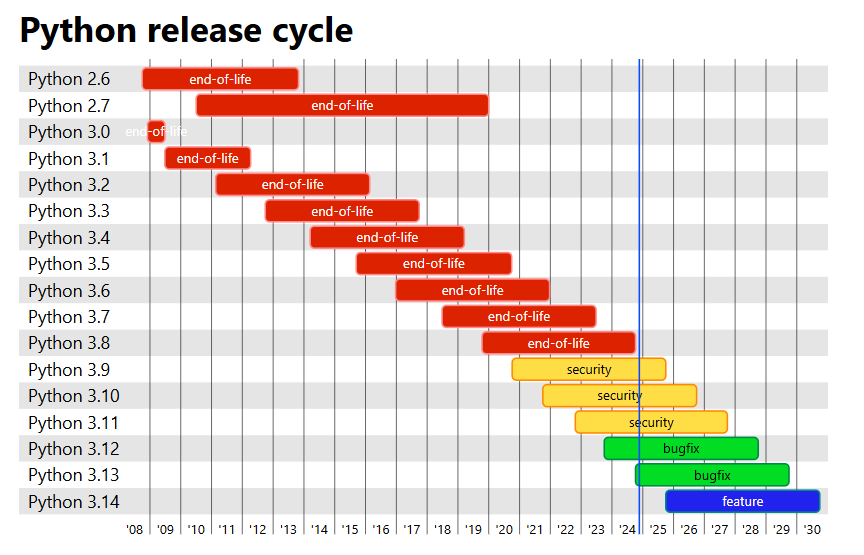
"네...? 당장 파이썬 3.8이 유지 보수가 끝난다고요...?"** 🚨 python 3.8, 2024년 10월 end-of-life 🚨 **

그렇다. 우리는 파이썬 버전을 업그레이드 하는 것에 더이상 지체할 수 없다... 생각했다.
버전을 왜 올려야 하는가? 꼭 올려야 하는가?
일단 우리는 제품 관점에서 파이썬을 꼭 version up을 해야 하는지를 검토해야 했다. '당연히 올려야 하는 것 아닌가?' 싶었지만 그런 고민을 하게 된 이유는 도메인 및 제품의 특성에 연관되어 있었다. 제품 특성을 보자면,
- 현재 프로덕트는 폐쇄망에 배포한다.
- 싱글 테넌시(single tenancy) 구조로 배포 중이고, 어떤 배포 환경(예. A 고객사)에는 더이상 우리가 지원을 안할 수도 있다.
- 그래도 지속적으로 제품 기능이 개발되고 고도화 되고 있다.
크게는 위와 같이 3가지 정도로 정리할 수 있었다.
그리고 파이썬 업그레이드를 해야 하는 일반적인 이유는 다음과 같다.
- 보안 패치가 되지 않기 때문에 보안 취약점이 생긴다.
- 주요 라이브러리(package)의 지원이 끊길 수 있다.
- 파이썬의 개선 사항과 새로운 기능을 활용할 수 없다.
- 도커 등 배포 환경에서의 호환이 안될 가능성이 높아진다.
등등...
현실과 이상을 고민하며 '왜 우리는 파이썬 버전을 올려야하는지'에 대해 심도있게 고민해보고 결론을 도출했다.
- 폐쇄망에 배포하고 있다는 것은 공개망 서비스보다는 보안에 대한 고민을 조금은 덜 수 있다. 그렇다고 해서 절대적으로 보안이 안전하다고 할 순 없다. (폐쇄망 내부에서도 보안 이슈는 당연 가능성이 있음)
- 어떤 고객사에는 배포를 지원을 안할 수도 있고, 이 얘기는 현재의 버전을 픽스한 채로 지원을 종료할 수 있다는 얘기다. 하지만 일부에만 국한한 얘기이고 앞으로도 고객사는 늘려 나갈 예정이기 때문이라 '우리가 지원하는 행위 자체'를 중단한다는 얘기는 아니다.
- '고객사를 늘려 나갈 예정'이고 그런 이유로 제품 기능의 개발과 고도화는 계속 될 것이기 때문에 프로젝트는 on going 상태다.
만약 제품의 기능 개발이 중단되었거나, 현재의 기능을 더이상 업데이트하지 않거나, 최신의 제품으로 배포가 안된다고 하면 파이썬 버전을 고민하지 않아도 되겠다. 하지만 여러 관점으로 고민해봐도 우리의 제품은 여전히 살아있고 관리 대상이다. 그렇다면 더더욱 버전 업을 안 할 이유가 없었다.
점진적으로 작업하여 버전업하기
프로젝트의 덩치가 꽤 큰 편이라서 파이썬 버전을 그냥 올렸을 때 예상되는 사이드 이펙트 범위가 감이 오지 않았다.
"주요 기능이 터져 버리면 어떡하지?"
레거시를 고치거나 리팩터링을 진행할 때 드는 생각과 비슷하다. 이에 따라 안정적인 버전업을 위해 다음과 같은 단계를 정하고 작업을 진행했다.
- 올릴 파이썬 버전 정하기(근데 이제 패키지 호환을 곁들인)
- built-in 메소드 변경 사항 확인하기
- 테스트와 시나리오 점검으로 안정성 높이기
- 배포 프로세스 검토
올릴 파이썬 버전 정하기(근데 이제 패키지 호환을 곁들인)
그렇다면 우리는 앞으로 어떤 파이썬 버전을 써야 하는 것일까? 이에 대해 팀내에서 두 가지 의견이 대립했다.
"당장 최신의 파이썬을 사용하자 vs. stable한 파이썬 버전을 사용하자"
최신의 파이썬을 쓰자는 말은 구미가 당기는 말이긴 하다. 한 번의 수정으로 *당분간의 버전 업을 고민하지 않을 수도?*라는 생각을 했기 때문이다.
그러나 최신의 것이 항상 옳은 것은 아니다. 파이썬 3.13은 이제 막 새로 나왔을 때고 stable하지 않을 가능성이 높았다. 그리고 현재 프로젝트에 설치된 패키지와 작성한 코드와의 호환성도 당연 고려해야 했다. 그래서 이번 업무 범위에서 가장 중요하게 봤던 '파이썬과 패키지들과의 호환성'을 조사했다. 여기서의 목표는 '현재 쓰고 있는 패키지들이 최대 몇 버전의 파이썬까지 지원 가능한지, '상한(upper bound)' 버전을 찾는 것이었다.
일반적으로 파이썬 패키지는 PyPI라는 사이트에 배포되어 있다. 이 사이트에는 각 패키지에 대한 메타 정보도 함께 공개되어 있다. 이런 정보들은 실제 사이트에서도 확인할 수 있지만, PyPI에서 제공하는 API를 통해서 확인할 수도 있다. 사용하는 패키지는 100개가 넘었기에 API를 사용하여 확인하기로 했다. (requirements.txt에 적어둔 package를 기준으로 조사했다.)
pythonimport requests

def get_python_compatibility(package_name, package_version):
    url = f"https://pypi.org/pypi/{package_name}/{package_version}/json"
    response = requests.get(url)
    if response.status_code == 200:
        data = response.json()
        # 💡 requires_python 값이 각 패키지에서 지원하는 파이썬 버전이다.
        requires_python = data["info"].get(
            "requires_python", "지원 파이썬 버전 정보 없음"
        )
        return requires_python
    else:
        return "패키지 정보를 가져오지 못함"


file_name = "requirements.txt"

with open(file_name, "r", encoding="utf-8") as file:
    for line in file:
        package_name, package_version = line.strip().split("==")
        print(package_name, package_version)
        print(get_python_compatibility(package_name, package_version))
        print()
조사한 패키지들 중에 딱 하나의 패키지가 상한 버전이 적혀 있었다.scipy라는 패키지만 <3.11이라고 상한을 명시했다. 이에 따라 파이썬 3.11까진 올리긴 어렵다는 판단을 했다.
💡결론: 파이썬 3.10.x를 사용하자(patch 버전은 가장 높은 걸로)
(그 다음 파이썬 버전 적용하는 것은 패키지들의 버전을 먼저 업데이트 해야 가능할 것으로..)
built-in 변경 사항 확인하기
파이썬 버전을 결정했으니, 파이썬 버전의 변경 사항을 확인했다. 이는 버전에 맞는 공식 문서를 참고했다.
여기에서 확인할 포인트는 'deprecated'된 사항이 있는지, 기존에 있던 built-in 메소드나 클래스가 '없어졌는지'를 확인하는 것이었다. 기존의 코드가 돌아가는지를 확인하기 위해선 새로 추가된 사항을 보진 않아도 되었기 때문이다.
이번 작업 경우에는 클래스 하나의 경로가 완전히 변경되었다. 파이썬 3.10부터는from collection import Iterable이라는 경로는 완전하게 삭제가 되었고(그 전까지는 deprecated warning 정도) from collection.abc import Iterable로 변경되었다. 이런 경우는 경로 수정을 통해서 조치를 취할 수 있었다. (python 3.9 공식문서의 collections에서도 3.10에서는 지워진다는 문구를 확인할 수 있다.)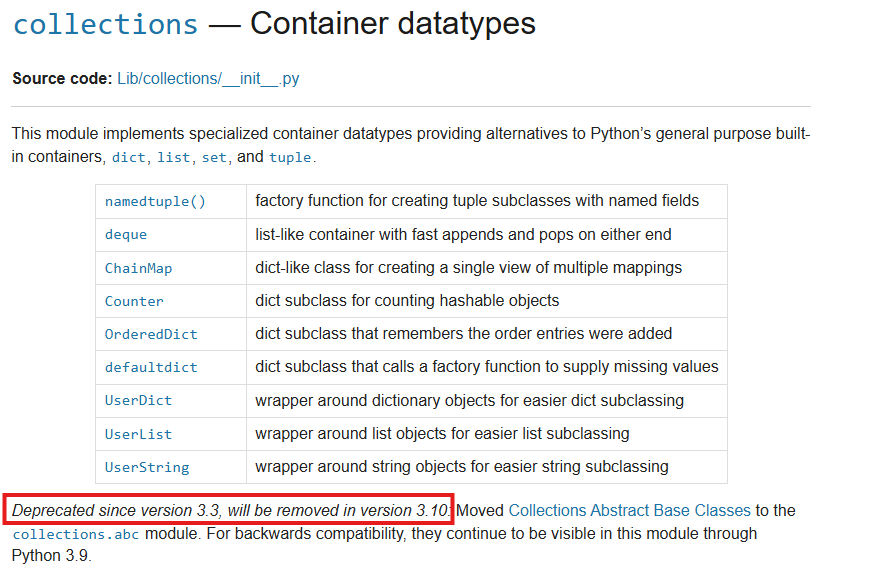
테스트와 시나리오 점검으로 안정성 높이기
📌 테스트 코드 돌리기
테스트 코드가 잘 짜여져 있다면 테스트 코드를 실행해보면 좋다. 실행했을 때 예상치 못하게 터지는 경우가 있어서(특히 built-in 메소드가 변경 된 경우) 조치를 취하기 쉬웠다.
📌 유저 시나리오에 따라 확인하기
단위 테스트를 마쳤다면, 유저 시나리오에 따라 확인하는 절차도 거쳐야 한다. 따로 자동화된 코드가 없는 상황이었기 때문에 로컬 환경에 프론트엔드 프로젝트를 git clone 받아 컨테이너를 띄워두고 직접 기능 테스트를 했다. 추가로 사내 개발기에 배포 후에도 더블 체크하였다.
배포 프로세스 검토
로컬에서 테스트를 마쳤다면, CI/CD 레벨에서 배포할 때 문제가 없는지 검토를 했다.
필자의 경우에는 Dockerfile에 명시되어 있던 python 이미지를 변경해야 했다. 기존에는 brunneis/python:3.8.6-ubuntu 버전을 사용하고 있었고 이를 python:3.10.15-slim 이미지로 변경했다.
## brunneis/python:3.8.6-ubuntu 대신 공식 이미지로 변경

python:3.10.15-slim

ENV TZ=Asia/Seoul

RUN ln -snf /usr/share/zoneinfo/$TZ /etc/localtime \
    && echo $TZ > /etc/timezone \
    && apt update \
    && apt install -y vim git sudo
# (이하 생략)
다만 기존에 쓰고 있던 brunneis/python:3.8.6-ubuntu 이미지는 apt 패키지를 slim 이미지보다 더 제공하고 있었다. 이에 따라 빌드 과정에서 에러가 난 것을 토대로 apt 패키지도 추가로 설치해줘야 했다.
python:3.10.15-slim

ENV TZ=Asia/Seoul

RUN ln -snf /usr/share/zoneinfo/$TZ /etc/localtime \
    && echo $TZ > /etc/timezone \
    && apt update \
    && apt install -y vim git sudo \
    ## 특정 패키지가 c 빌드를 하고 있어 아래의 apt 패키지들이 빌드 때 필요했음
    && apt install -y gcc make
# (이하 생략)
Dockerfile을 수정하고 빌드 테스트를 하였고, 배포 완료했을 때 큰 이상 없이 서비스가 운영이 되는 것을 확인하였다.
이로써 파이썬 3.8에서 3.10으로 버전 업을 하는 과정을 마무리하였다.
마치며 🛠️
이번 작업을 통해 우리는 왜 지속적인 버전 확인과 관리가 필요한지 다시금 실감할 수 있었다. 특히 패키지가 지원하는 파이썬 버전을 조사하면서, 파이썬 버전 상한 버전에 부딪히게 되면 그 이상의 버전 업이 안되므로 해당 패키지의 유지 보수 종료로 인해 프로젝트의 안정성을 약화시킬 수 있다는 점을 깨달았다. 이는 결국 시간이 지날수록 더 큰 기술 부채로 작용할 수 있음을 인지하게 된 계기였다.
이를 바탕으로 앞으로 프로젝트에서 사용 중인 패키지들의 버전을 주기적으로 점검하고, 하나씩 최신화하는 과정을 체계적으로 진행해야겠다는 결론에 도달했다. 파이썬 버전과 패키지 버전을 함께 점검하고 재귀적으로 업데이트를 수행한다면, 항상 최적의 상태를 유지할 수 있을 것이라는 기대감도 갖게 되었다.
또한 프로젝트는 하나의 집과 같다는 생각이 들었다. 완성했다고 끝나는 것이 아니라 지속적인 보수를 통해 견고함을 유지해야만 안정적으로 활용할 수 있다는 점에서 유사하다고 느꼈다. 앞으로도 이러한 마음가짐으로 프로젝트를 하나의 "집"처럼 꾸준히 점검하고 관리하며 견고하게 유지해 나갈 것을 다짐한다.