파이썬의 데코레이터를 파헤쳐보자(feat. 백엔드 예제)
당신의 함수를 꾸며보자(귀엽고 깜찍하게)

들어가는 글 🙋♀️
파이썬에는 데코레이터라는 기능이 있다. 코드 상에서 @ 문법으로 해당 기능을 사용할 수 있다. 이 데코레이터라는 기능을 잘 사용하면 다음과 같은 효과를 얻을 수 있다.
반복 코드를 삭제하며 코드 가독성을 높혀주고, 기능에 대한 이해도 또한 상승한다.
이번 글은 기본적인 데코레이터의 개념과 사용 방법, 백엔드 개발 시 사용하는 사례를 소개하여,
- 파이썬을 접한 지 얼마 안됐지만 반복적인 코드를 줄여보고 싶은 사람이나
- 백엔드 실무에서 파이썬을 사용할 때 어떤 사례로 데코레이터를 쓰는 지 궁금한 사람에게
데코레이터를 이해하여 사용할 수 있게 작성하는 것에 목적을 둔다.
데코레이터(decorator)란?
데코레이터는 함수 또는 클래스를 인자로 받아 로직을 처리 후 함수 그 자체를 리턴하는 **고차 함수(Higher-Order Function, HOF)**를 의미한다.
(출처 : wikipedia)
고차 함수(高次函數, higher-order function)는 수학과 컴퓨터 과학에서 적어도 다음 중 하나를 수행하는 함수이다
- 하나 이상의 함수를 인수로 취한다.
- 함수를 결과로 반환한다.
데코레이터 사용은 어떻게 할까?
기본적인 사용 방법 📝
파이썬은 함수형 프로그래밍 언어는 아니지만, 그에 준하는 기능을 사용할 수 있다. '클로저(closure) 패턴을 사용하여, 다음의 예시와 같이 함수를 감싸는 형태의 함수를 만들 수 있다는 점이 그렇다.
pythondef example_decorator(func):
    def wrapper():
        print("변수로 받은 함수 **실행 전**에 수행하는 로직")
        func()  # 변수로 받은 함수가 여기서 실행됨
        print("변수로 받은 함수 **실행 후**에 수행하는 로직")
    return wrapper  # 내부에서 선언한 wrapper라는 이름의 함수를 return
고차 함수에는 다른 함수를 파라미터로 넣어서 함께 실행이 가능하다.
pythondef my_function():
	print("여기에서 무언가 로직이 실행됨")
    print("함수를 감싼 거니까")

example_function = example_decorator(my_function)  # 고차 함수를 실행하기 위해 함수 객체를 변수에 할당
example_function()  # 할당된 변수로 함수를 호출
shell# 출력 값은 다음과 같다.
"변수로 받은 함수 **실행 전**에 수행하는 로직"  # 고차 함수에서 실행
"여기에서 무언가 로직이 실행됨"  # 원하는 함수(my_function)에서 실행
"함수를 감싼 거니까"  # 원하는 함수(my_function)에서 실행
"변수로 받은 함수 **실행 후**에 수행하는 로직"  # 고차 함수에서 실행
이를 통해 my_function이라는 함수가 실행되기 전후로 고차 함수의 print가 실행되는 것을 확인할 수 있다.
데코레이터는 위와 같은 고차 함수를 @ 문자와 함께 타 함수 위에 붙여서 사용할 수 있으며, 대상이 되는 함수에 _"이 함수 위에 데코레이터가 있으니 함수 전후로 다른 로직이 실행이 될 수 있겠다"_라는 생각을 할 수 있게 명시하는 역할을 하기도 한다.
python@example_decorator  # 이런 형식으로 쓰는 것을 '데코레이터'라고 함
def my_function():
	print("여기에서 무언가 로직이 실행됨")
    print("함수를 감싼 거니까")

my_function()  # 대상 함수를 직접 호출하면서도 위와 동일한 print 결과를 얻을 수 있다.
사용시 유의점 ✋
기능에 따라 데코레이터의 순서 체크가 필수!
데코레이터는 함수에 여러 개를 붙일 수 있다. 이 때, '데코레이터의 순서'는 중요하다. 데코레이터 순서가 바뀌면 함수를 감싸는 순서도 달라지기 때문이다.
다음과 같이 데코레이터가 두 개가 있다고 하자.
pythondef example_decorator_1(func):
    def wrapper():
        print("데코레이터 1에서 실행 (대상함수 실행 전)")
        func()  # 변수로 받은 함수가 여기서 실행됨
        print("데코레이터 1에서 실행 (대상함수 실행 후)")
    return wrapper


def example_decorator_2(func):
    def wrapper():
        print("데코레이터 2에서 실행 (대상함수 실행 전)")
        func()  # 변수로 받은 함수가 여기서 실행됨
        print("데코레이터 2에서 실행 (대상함수 실행 후)")
    return wrapper
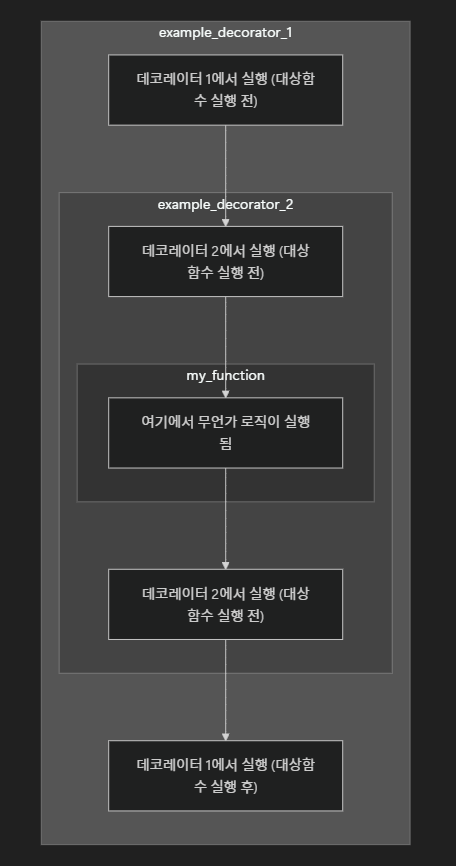
1️⃣ 데코레이터 1 -> 데코레이터 2 순서대로 데코레이터를 붙인 경우
python@example_decorator_1
@example_decorator_2
def my_function():
    print("여기에서 무언가 로직이 실행됨")

my_function()
shell# 출력
데코레이터 1에서 실행 (대상함수 실행 전)
데코레이터 2에서 실행 (대상함수 실행 전)
여기에서 무언가 로직이 실행됨
데코레이터 2에서 실행 (대상함수 실행 후)
데코레이터 1에서 실행 (대상함수 실행 후)
- 위의 실행 순서를 도식화 하면 다음과 같이 실행된다고 볼 수 있다.
2️⃣ 데코레이터 2 -> 데코레이터 1 순서대로 데코레이터를 붙인 경우
python@example_decorator_2  # 위와 달리 example_decorator_2를 먼저 실행
@example_decorator_1
def my_function():
    print("여기에서 무언가 로직이 실행됨")

my_function()
shell# 출력
데코레이터 2에서 실행 (대상함수 실행 전)  # 대상 함수 실행 전 출력 순서도 달라짐
데코레이터 1에서 실행 (대상함수 실행 전)
여기에서 무언가 로직이 실행됨
데코레이터 1에서 실행 (대상함수 실행 후)
데코레이터 2에서 실행 (대상함수 실행 후)  # 대상 함수 실행 후 출력 순서도 달라짐
💡 따라서 실행 순서가 중요해진 경우가 발생할 수 있다. 특히 다수의 package에서 제공하는 데코레이터를 여러 개 붙여 사용할 땐 데코레이터 사이에도 디펜던시가 발생할 수 있어 이를 유의해야 한다.
함수의 속성의 변경 가능성: functools.wraps 사용(주요 권장 방식✅)
파이썬의 함수는 __name__과 __doc__라는 속성을 갖고 있는데, 데코레이터를 이용하다 보면 이들의 값이 변경될 수 있다.
pythondef example_decorator(func):
    def wrapper():
        print(f"{func.__name__} 실행 전")
        func()
        print(f"{func.__name__} 실행 후")
    return wrapper


@example_decorator
def my_function():
    print("여기서 무언가 로직이 실행됨")

print(my_function.__name__)  # 여기서 보통은 'my_function'이 출력 값이라고 예


상
shell# 출력
wrapper  # 이는 example_decorator 내부에 선언된 wrapper의 이름으로 덮어씌워져 출력된 것
이에 따라 파이썬의 built-in인 functools.wraps를 이용하여 이를 방지할 수 있다.
functools.wraps 또한 데코레이터로 쓸 수 있는 고차 함수이고, 이는 대상 함수의 속성이 변경되지 않도록 해준다. 따라서 주로 이 방식을 이용하여 고차 함수 내의 wrapper 함수를 정의한다.
pythonfrom functools import wraps


def example_decorator(func):
    @wraps(func)  # wraps도 데코레이터로써 사용됨
    def wrapper():
        print(f"{func.__name__} 실행 전")
        func()
        print(f"{func.__name__} 실행 후")
    return wrapper


@example_decorator
def my_function():
    print("여기서 무언가 로직이 실행됨")

print(my_function.__name__)
shell# 출력
my_function
대상 함수의 인자를 받으려면 *args와 **kwargs 사용
당연히 대상 함수에 인자가 있다면 이를 그대로 받아서 사용해야 한다. 이땐, *args와 **kwargs를 이용하면 쉽게 사용할 수 있다.
pythondef double(func): @wraps(func) def wrapper(*args, **kwargs): # func에 줄 인자를 받는다 args = list(args) args[0] *= 2 # 두 배 씩 늘리기 args[1] *= 2 # 두 배 씩 늘리기 return func(*args, **kwargs) return wrapper @double def add_digits(a, b): return a + b print(add_digits(2, 3))
shell# 결과
10
Flask에서의 데코레이터 적용 사례 🧱
Flask, Django, FastAPI 등의 웹 프레임워크를 사용하면서 데코레이터를 적용하는 사례는 인증, 인가, 로깅 등의 기능을 추가할 때 사용한다. 공통점이 있다면, 대체적으로 모든 API에서 수행되는 공통의 모듈을 만들어야 하는 경우에 사용할 수 있다.
이번 글에서는 Flask 예시를 들어 설명하고자 한다.
인증(authentication)
사용자가 어떤 사람인지 확인하기 위한 인증 로직을 구현할 수 있다. API 핸들러 함수가 실행 되기 전에 인증 관련 체크를 하고(ex. API KEY, JWT token 등) 이에 따라 인증이 되지 않은 경우는 데코레이터 내에서 401 처리를 하고 early return을 할 수 있다.
다음은 jwt 기반의 인증 로직의 예시이다.
pythonimport jwt
from flask import Flask, request, jsonify
from functools import wraps


app = Flask(__name__)


SECRET_KEY = app.config["SECRET_KEY"]

def require_jwt(func):
    """JWT 토큰을 검증하는 데코레이터"""
    @wraps(func)
    def wrapper(*args, **kwargs):
        auth_header = request.headers.get("Authorization")
        if not auth_header or not auth_heade


r.startswith("Bearer "):
            return jsonify({"error": "Missing or invalid Authorization header"}), 401

        token = auth_header.split(" ")[1]

        try:
            decoded_token = jwt.decode(token, SECRET_KEY, algorithms=["HS256"])
        except jwt.ExpiredSignatureError:
            return jsonify({"error": "Token has expired"}), 401
        except jwt.InvalidTokenError:
            return jsonify({"error": "Invalid token"}), 401

        # func이 실행되기 전에 위의 인증 과정을 먼저 거쳐
        # 미인증된 경우, 비즈니스 로직 시행 이전에 401 status code를 보내줄 수 있다.

        # 대상 함수(api 핸들러) 실행
        return func(*args, **kwargs)

    return wrapper

@app.route("/auth", methods=["POST"])
@require_jwt  # 데코레이터 추가
def authenticate_user():
    return jsonify({"message": "토큰 검증 완료!"}), 200

if __name__ == "__main__":
    app.run(debug=True)
- 참고로 flask의 경우에는,
flask_jwt_extended라는 패키지를 설치하면 정교한 jwt 제어를 위한 데코레이터를 제공해주고 있다. 위의 코드는 예시 중 하나일 뿐, 실제 구현은 패키지를 쓰는 것이 개발 및 유지 보수 면에서 편하다. (커스터마이징이 크게 필요하지 않다면)
인가(authorization)
사용자의 권한에 따른 API 요청을 제어할 수 있다. 이 또한 (인증 단계와 비슷하게) API 핸들러 함수가 실행되기 이전의 로직을 데코레이터에서 실행하여, 유저의 권한과 다른 경우엔 비즈니스 로직 실행 이전에 early return 해주면 된다.
pythonfrom flask import Flask, request, jsonify
from functools import wraps

# id, name, role 컬럼으로 이뤄진 Users 모델이 존재한다고 가정
from src.models.user import Users


app = Flask(__name__)

def require_role(role):
    """사용자 역할(Role)을 확인하는 인가 데코레이터"""
    @wraps(func)
    def wrapper(*args, **kwargs):
        username = request.get_json()["user_id"
        user = Users.get(username)

        if not user:
        	return jsonify({"error": "User not found."}), 403

        if user.role != role:
            return jsonify({"error": f"Access denied. {role} role required."}), 403

        # func이 실행되기 전에 위의 인증 과정을 먼저 거쳐
        # 지정된 role이 다른 유저가 API를 요청한 경우,
        # 비즈니스 로직 시행 이전에 401 status code를 보내


줄 수 있다.

        # 대상 함수(api 핸들러) 실행
        return func(*args, **kwargs)
    return wrapper


@app.route("/admin", methods=["GET"])
@require_role("admin")  # admin 유저만 호출할 수 있게 데코레이터 추가
def check_user_is_admin():
    return jsonify({"message": "Welcome, Admin!"}), 200

@app.route("/edit", methods=["GET"])
@require_role("editor")   # editor 유저만 호출할 수 있게 데코레이터 추가
def edit_content():
    return jsonify({"message": "You can edit content!"}), 200

if __name__ == "__main__":
    app.run(debug=True)
-
인가는 인증과 함께 쓰이는 경우가 많기 때문에, 일반적으로는 인증과 인가 데코레이터가 같이 쓰일 수 있다.
python@app.route("/admin", methods=["GET"])
@require_jwt  # 인증 데코레이터
@require_role("admin")  # 인가 데코레이터
def check_user_is_admin():
    return jsonify({"message": "Welcome, Admin!"}), 200
로깅(logging)
API의 access log를 로깅할 수도 있다. API 핸들러를 거쳐 비즈니스 로직을 수행하기 전후로, request 정보와 response 정보를 모두 취합할 수 있다.
pythonfrom flask import Flask, request
from functools import wraps

app = Flask(__name__)

def logging_access(func):
    """요청이 들어오면 엔드포인트와 데이터를 로깅하는 데코레이터"""

    @wraps(func)
    def wrapper(*args, **kwargs):
    	"""예시에서는 단순 print를 썼지만, logger로 sysout 표출하거나 db 적재 로직을 함께 추가할 수 있다"""

        print(f"요청: {request.method} {request.path}")  # 요청 메서드 및 경로
        print(f"요청 데이터: {request.args.to_dict()}")  # 쿼리 파라미터 확인

        response = func(*args, **kwargs)  # 대상 함수(api 핸들러) 실행

        # response의 경우에는 func이 먼저 실행되고 난 후
        print(f"응답 코드: {response.status_code}")

        return response  # 핸들러 실행 결과는 꼭 return 해줘야 올바르게 된다.
    return wrapper


@app.route("/", methods=["GET"])
@logging_access
def hello():
    return "Hello, Flask!"


if __name__ == "__main__":
    app.run(debug=True)
- '사용자가 어떤 행위를 해서 쌓이는 데이터'를 적재하는 로깅의 목적과 비슷하게, '알람' 기능 또한 데이터를 적재함에 있어서 데코레이터로 기능을 만들어서 데이터를 쌓을 수 있다.
마치며 🙌
이번 글에서는 파이썬의 기본 문법이면서 매력적인 기능인 데
코레이터에 대해서 설명했다. 그리고 파이썬으로 서버 개발할 때 해당 데코레이터를 사용하면서 어떤 로직들을 편하게 구현할 수 있는지도 소개했다.
물론 무분별한 데코레이터 사용은 데코레이터 간의 dependency를 만들어 오히려 복잡해지는 면이 있기 때문에, 중복 코드를 제거 하는 데에 있어서 적절히 사용하면 좋을 것이다.
데코레이터를 사용함으로써 코드의 가독성을 높이고 유지 보수에 도움이 될 수 있어 효율적인 기능이므로 사용을 추천하는 바이다.