print("hello world!")는 어떻게 sysout으로 hello world!를 출력할까? - Cpython 세계 입문하기
로우레벨의 세계는 늘 새롭다
들어가는 글 🙋♀️
파이썬은 수많은 프로그래밍 언어 중에서도 가장 인간 친화적인 언어라고 불린다. 영어처럼 읽히는 문법 덕분에, 코드를 처음 접하는 사람도 비교적 쉽게 이해할 수 있다. 그래서 파이썬으로 백엔드를 개발하고 있던 나는 늘 “어떻게 하면 사람들이 내 코드를 이해할 수 있게, 비즈니스 로직을 더 잘 이해할 수 있게 쓸 수 있을까?”에 집중해왔다.
여느 때와 같이 API 개발과 백그라운드 태스크 구축을 하던 어느날, 그런 생각이 들었다. 근데.. 이 파이썬은 '어떻게' 코드가 실행 되는 것이지? 말인 즉슨 작성한 코드가 어떻게 읽히고, 어떻게 해석되며, 어떤 과정을 거쳐 출력으로 이어지는지, 그동안 당연하게 여겼던 그 이면이 궁금해졌다.
이번 글에서는 문득 들어버린 호기심에,
"print("hello world!") 한 줄을 시작으로 파이썬이 이 코드를 어떻게 해석하고 실행하는지," cpython의 세계에 대해 정리하고자 한다.
파이썬은 어떻게 코드를 실행할까? 💡
파이썬의 기본 상식이지만, 파이썬은 인터프리터(interpreter) 언어이다.
프로그래밍 언어의 소스 코드를 바로 실행하는 컴퓨터 프로그램 또는 환경을 말한다. 원시 코드를 기계어로 번역하는 컴파일러와 대비된다. - wikipedia
한 줄 한 줄, 인터프리터가 읽어가는 방식으로 실행이 되기 때문에 컴파일된 실행 파일이 따로 떨어지지 않고 바로 소스코드를 실행 시킨다는 것에 컴파일 언어랑 대비되는 차이점이다.
파이썬의 인터프리터는 c언어로 이뤄져 있고, 기본적으로 널리 쓰이는 파이썬은 'Cpython'이라고도 한다. Cypthon이 궁금하다면 github repository를 방문하여 소스 코드도 볼 수 있다.
<간단하게 설명한 파이썬 인터프리터의 종류와 특징>
| 인터프리터(파이썬 구현체) | 언어 | 특징 |
|---|---|---|
| CPython | C | 가장 보편적, 우리가 일반적으로 쓰는 파이썬 |
| PyPy | RPython | 더 빠르지만 완전한 호환은 아님 |
| Jython | Java | 자바 환경에서 파이썬 쓰기 |
| IronPython | C# | .NET 기반에서 파이썬 돌리기 |
그럼 이 인터프리터는 .py 파일을 어떻게 해석하고 해석한 것을 실행하는 것일까. 다음의 세 단계를 거쳐서 실행이 된다고 할 수 있다.
-
파싱 (Parsing): 코드는 먼저 파서(parser)에 의해 토큰(token)으로 분리되고, 이를 기반으로 추상 구문 트리(AST, Abstract Syntax Tree)라는 자료구조가 생성됨 -
컴파일 (Compilation): AST는 파이썬 바이트코드(bytecode)로 변환된다. 이 바이트코드는.pyc파일로 저장 -
실행 (Execution): 바이트코드는 파이썬의 가상 머신(Virtual Machine) 위에서 한 줄씩 실행된다. CPython에서는 이 동작을ceval.c파일에 구현된 바이트코드 실행 루프가 담당
이 모든 과정은 우리가 python script.py라며 파일(script.py라는 이름으로 파일을 생성했을 때)을 cli로 실행하는 그 순간, 단시간에 수행한다.
print("hello world")를 실행한다면?! 🖨️
프로그래밍 언어의 제일 첫번째가 되는 예시, print("hello world!")는 내부적으로 어떤 여정을 거칠까?
print("hello world!")
위에서 설명한 파싱(parsing), 컴파일(Compilation), 실행(execution)의 단계를 나눠 위 파이썬 코드의 실행과정을 설명한다.
파싱(parsing)
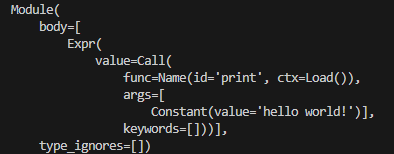
먼저 토큰 단위로 파싱이 된다. print("hello world!")는 함수 호출 노드(Call), 식별자(Name: print), 문자열 상수(Constant: "hello world!") 등으로 해석된다. 해석이 된 각각의 토큰이 유효하다고 하면 추상 구문 트리(AST)를 만든다.
- AST는 바이트코드 생성이 끝날 때까지 메모리에 로드
- ast 모듈(파이썬 모듈)을 통해 해당 구문의 AST 형태를 확인할 수 있음
py
import ast tree = ast.parse("print('hello world!')") print(ast.dump(tree, indent=4))- 출력
- 출력
python 3.9 이상부터는 PEG parser라는 파서를 이용하고 있고, 이는 여기 디렉토리의 pegen.c, pegen.h 등을 살펴보면 된다.
컴파일(Compilation)
생성된 AST는 바이트코드로 컴파일된다. 이 바이트코드의 실행 순서를 직접 확인해보려면 dis라는 builtin 모듈을 이용해, 다음과 같이 확인할 수 있다.
-
코드
pyimport dis dis.dis("print('hello world!')")dis모듈은? 👉 파이썬 코드를 바이트코드로 분해(disassemble) 해주는 내장 모듈
-
출력
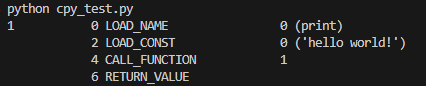
이 과정에서 문자열 상수 "hello world!"는 상수 테이블(constant pool) 에 저장되며, 이후 실행 단계에서 LOAD_CONST 명령어를 통해 해당 값을 로딩하게 된다. 관련된 정의는 code.h의 상수 테이블 구조에서 확인할 수 있다.
실행(execution)
-
이름 로딩 (LOAD_NAME): 인터프리터는 print라는 이름이 현재 스코프에 존재하는지 확인. 이는 내장 함수로, builtins 모듈에서 찾게 된다.- 해당 함수의 이름은
builtin_print_impl, 이 함수가 존재하는 builtin script이며, - 위의 함수를 builtin_methods static PyMethodDef 테이블)에
print라는 포인터로 등록하였기 때문에, 실제로는print라는 문법으로 썼을 때 builtin_print가 실행된다.
- 해당 함수의 이름은
-
상수 로딩 (LOAD_CONST): 문자열"hello world!"를 상수로서 메모리에 로딩- 파일 단계에서 이 문자열은 바이트코드에 포함되는 상수 테이블(constant pool)에 저장된다. 그리고 실행 단계에서는 해당 상수를 이 테이블에서 불러와 메모리에 로딩한다.
- 상수를 관리하는 관련된 코드는 이곳을 확인하면 된다.
-
함수 호출 (CALL_FUNCTION): print 함수의 문자열 인자에 위의 상수를 넘겨 호출한다. -
실제 출력 처리: print 함수는 내부적으로 파이썬의sys.stdout.write()를 호출해 문자열을 터미널(표준 출력)에 출력한다.
이렇게 아주 간단한 것 같은, 그러나 내부에선 꽤나 복잡하게 돌아가고 있는,
print("hello world!")가 터미널에 출력되는 과정을 살펴보았다.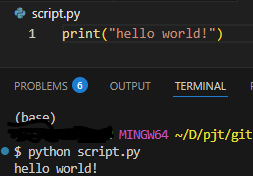
마치며 🐍
파헤치는 과정에서 파편적으로 알고 있던 지식들을 유기적으로 엮어 보는 계기가 되었다. 엮어 본 지식들은 다음과 같다.
- 인터프리터도 결국엔 컴파일의 과정을 거친다. 컴파일러와 다르게 파일을 생성하지 않고 한 줄 씩 읽으면서 컴파일 하는 것일 뿐
- 그래서 읽다가 문제가 생기면(error를 발견하면) 실행이 멈추는 것
- 파이썬은 C언어로 구현되었다 == 파이썬 인터프리터가 C 구현체이다
- 백준 사이트 등에서 **"Cpython 또는 pypy로 돌리는 것은 차이가 있다"**는 의미가 좀 더 와닿게 되는 계기
- AST 구조로 토크나이징 한 코드를 저장하여 실행한다는 것을 알게 됨
- 그저 '코드 한 줄'이라고 생각한 것도 내부에서 돌릴 땐 트리 구조에 따라 계층이 나뉘고 실행이 됨
이번 글을 정리하면서 익숙하게 사용하고 있던 파이썬의 내부 실행 로직을 보니, 마치 또 다른 세계가 열리는 것 같았다. 이제 cpython 탐험의 첫 발을 내딛는 것이니 좀 더 로우레벨의 공부도 함께 하면 좋겠다는 생각이 들었다.