로그는 어디서 수집해야 할까요?🤔 - Spring 프로젝트에서 로그의 목적에 따라 Filter, AOP, Scheduler 활용해보기
스프링 생태계도 함께 알아갔던 이번 프로젝트!

들어가는 글 🙋♀️
프로젝트를 하다 보면 다양한 로그를 수집해야 하는 상황이 있다. 특히 웹 프로젝트라면 API 요청/응답의 기록부터 사용자 통계, 에러 추적까지, 로그의 목적에 따라 적절한 수집 위치를 정하는 것이 중요하다. 필자 또한 이에 대한 고민을 해봐야 했던 상황을 직면했다.
기존 프로젝트에서 잠시 벗어나 약 두 달간 새로운 프로젝트에 투입되었다. 해당 프로젝트는 스프링 기반으로 진행되었으며, 나에게는 첫 번째 스프링 프로젝트였다. 그래서 프로젝트를 수행하며 프레임워크의 특징을 익히고 정리하는 시간을 가졌다. 참고로 이 프로젝트는 코틀린 스프링으로 구현되었기 때문에, 본문에서도 코틀린 예제를 주로 다룰 예정이다.
이번 프로젝트에서는 다양한 작업을 수행했지만, 특히 Elasticsearch와 Kibana를 활용한 대시보드 구성 및 이를 위한 로그 수집 작업이 주요 과제 중 하나였다. 기본적으로는 수집하려는 클래스나 메서드에 logger를 붙이고, logback-spring.xml 설정을 통해 로그를 파일로 관리하는 방식으로 진행되었다.
이 글에서는 로그 수집을 위해 스프링의 동작 방식을 이해하고, 로그 목적에 따라 수집 위치를 고민했던 과정을 정리하고자 한다. 스프링 프로젝트에서 로그 수집 아키텍처를 고민하는 독자들에게 도움이 되기를 바라는 마음이다.
수집해야 하는 로그의 종류 🗂️
요구사항을 확인하니 수집해야 할 로그에 대한 크게 3가지 종류로, 다음과 같이 정리할 수 있었다.
-
Access Log
- 사용자가 API를 호출한 시각, 요청 소요 시간(duration time), 헤더 정보 등이 포함된 로그
-
Custom Metric Log
- 어플리케이션의 유저 수를 주기적으로 저장하여 유저 수 추이를 시각화하는 로그
-
Error Log
- 어플리케이션 내 비즈니스 로직에 의해 발생한 에러를 기록하는 로그
따라서 Access Log , Custom metric Log, Error Log 정도로 수집 대상의 로그 종류를 정할 수 있었다.
스프링 프레임워크와 로그 수집 🗒️
그럼 우리는 이 로그들을 스프링의 어느 영역에서 쌓아야 할까?
📍 Access Log 수집은 어디에서 해야 할까? - Filter(vs. AOP)
첫 번째 요구사항인 Access Log 수집 위치를 정하기 위해 논의가 있었다. 초기에는 AOP를 활용해 로그를 수집하자는 의견을 들었지만, 조사해 보니 스프링 프레임워크에서는 AOP 외에도 여러 방식으로 로그를 수집할 수 있었다. 따라서 스프링의 요청/응답 처리 흐름을 이해하고, 로그 목적에 따라 적합한 수집 위치를 결정할 필요가 있었다.
스프링 프레임워크의 요청/응답 흐름과 액세스 로그
스프링 프레임워크는 servlet 컨테이너 위에서 동작하는 어플리케이션 레벨이다. servlet에서는 주로 요청/응답의 흐름을 관리하고 이에 따른 비즈니스 로직 등이 스프링 프레임워크 내부에서 처리된다. 도식을 보면 다음과 같은 흐름으로 클라이언트로부터 요청을 받고 로직 처리하여 응답을 보내주는 행위가 일어난다.
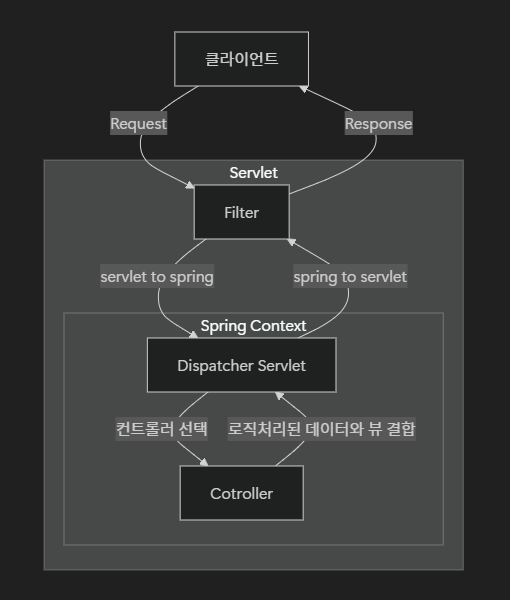
스프링 컨텍스트 내부에 Interceptor나 AOP를 추가하면, 흐름은 다음과 같이 세부적으로 확장된다.
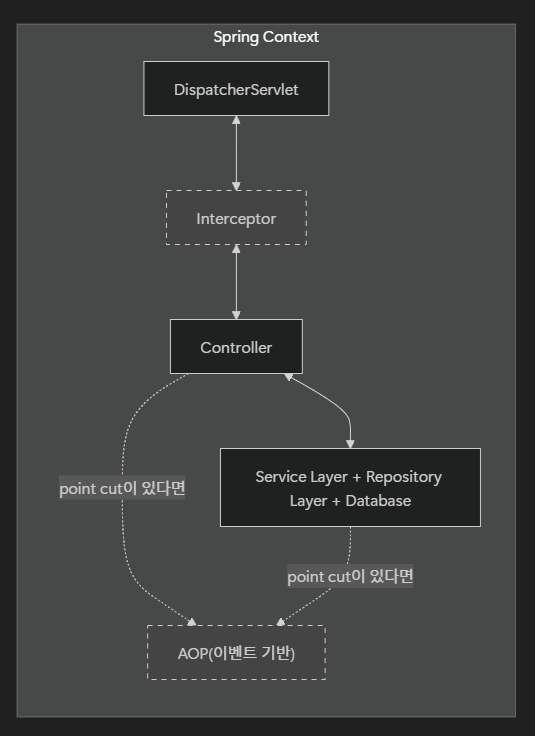
우리가 논의했던 Access Log 수집에 대해 집중하면, 다음 두 가지 옵션이 있었다.
- Filter
- 스프링 컨텍스트에 들어오기 전 요청/응답 흐름을 제어한다.
- Filter는 집 앞의 문지기와 같이, 문에서 드나드는 요청/응답을 제어할 수 있다.
- AOP
- AOP는 정해둔 이벤트가 있다면 Controller, Service, Repository 레이어와 상관 없이 동작을 한다.
- Spring Context가 집이라면 AOP는 수도공이나 배달원처럼 특정 상황에만 등장하는 역할이다.
그렇다면 Access Log은 어디에서 모아야 할까?
Access Log는 클라이언트의 요청/응답 흐름 정보를 수집해야 하므로, 요청과 응답을 직접적으로 제어하는 Filter에서 처리하는 것이 적합하다고 판단했다.
Filter class 정의
kotlinimport jakarta.servlet.Filter
import jakarta.servlet.FilterChain
import jakarta.servlet.FilterConfig
import jakarta.servlet.ServletRequest
import jakarta.servlet.ServletResponse
import jakarta.servlet.annotation.WebFilter
import jakarta.servlet.http.HttpServletRequest
import jakarta.servlet.http.HttpServletResponse
import org.slf4j.Logger
import org.slf4j.LoggerFactory

class LoggingFilter : Filter {
    private val logger: Logger = LoggerFactory.getLogger(LoggingFilter::class.java)

    override fun doFilter(request: ServletRequest, response: ServletResponse, chain: FilterChain) {
        // doFilter 메소드를 override하면서 로그 수집이 가능하다

        val httpRequest = request as HttpServletRequest
        val httpResponse = response as HttpServletResponse

        // 요청 정보 로그 -> logback-spring.xml을 통해 파일로 저장되는 위치
        logger.info("Incoming Request: Method=${httpRequest.method}, URI=${httpRequest.requestURI}, Query=${httpRequest.queryString}")

        val startTime = System.currentTimeMillis()
        chain.doFilter(request, response) // 다음 필터 또는 서블릿 호출
        val duration = System.currentTimeMillis() - startTime

        // 응답 정보 로그 -> logback-spring.xml을 통해 파일로 저장되는 위치
        logger.info("Outgoing Response: Status=${httpResponse.status}, Duration=${duration}ms")
    }
}
Bean 등록
kotlinimport com.mysite.filter.LoggingFilter import org.springframework.boot.web.servlet.FilterRegistrationBean import org.springframework.context.annotation.Baen import org.springframework.context.annotation.Configuration @Configuration class LoggingConfig { @Bean fun loggingFilter(): FilterRegistrationBean<LoggingFilter> { val registrationBean = FilterRegistrationBean<LoggingFilter>() registrationBean.filter = LoggingFilter() registrationBean.addurlPatterns("/*") // 모든 url에 대해 filter가 작동되게 함 return registrationBean } }
📍 스케줄링을 이용해 Custom Metric Log 수집하기 - Scheduled
'유저 수의 추이'에 대한 요구사항을 위해 spring에서 기본으로 제공하는 scheduled 어노테이션을 이용해 schedule component을 만들어서 로그를 기록했다.
여기서 schedule component는 스프링의 요청 흐름과 별개로 동작하는 비동기 작업이며, 주기성을 띄는 데이터를 로깅할 때 이용하면 된다.
💡 Custom Metrics Log란?
시스템의 특정 상태나 지표를 주기적으로 수집하여 추적하는 목적으로 쌓는 로그. 일반적인 Application 로그나 Performance 로그와는 달리, 데이터의 현재 상태를 모니터링하고 운영 데이터를 분석하기 위한 목적으로 사용된다.
scheduled component
kotlinimport org.slf4j.Logger
import org.slf4j.LoggerFactory
import org.springframework.scheduling.annotation.Scheduled
import org.springframework.stereotype.Component

@Component
class TableCountScheduler() {

    private val logger: Logger = LoggerFactory.getLogger(TableCountScheduler::class.java)

    @Scheduled(cron = "0 0 9 * * ?") // 매일 아침 9시에 실행
    fun logTableCount() {
        val count: Int? = userRepository.count()

        // logback-spring.xml을 통해 파일로 저장되는 위치
        logger.info("user count : {}", count)
    }
}
📍 비즈니스 로직을 수행하다가 생긴 로그를 쌓아야 해요! - AOP
이는 추가적인 요구사항으로 들어온 이야기였다. 이 부분은 이미 관련된 작업을 하고 있던 동료가 AOP 내에 logger를 붙인 상황이었고 필자는 이 logger를 통해 파일 저장이 되도록 logback-spring.xml에 설정을 추가하면 되었다. 다만 해당 AOP component에서는 어떤 성격의 로그가 쌓이는지 확인해야 파일을 나눠 저장하고 elasticsearch에 적절한 index를 추가하여 로그를 보낼 수 있을 거라 판단했다.
logger는 AOP와 연결된 pointcut에서 비즈니스 로직을 수행하다가 얻은 error가 있을 때 로깅을 하고 있었다. 따라서 해당 로그는 Error log에 가까웠다.
AOP에서도 특정 비즈니스 레벨의 error를 세분화 하여 구현했기에 좀 더 구체적인 customizing이 들어간 로거 설정이라 AOP에서 구현해도 괜찮다는 생각이 들었다.
AOP Component
kotlinimport org.aspectj.lang.annotation.Aspect
import org.aspectj.lang.annotation.AfterThrowing
import org.aspectj.lang.annotation.Pointcut
import org.slf4j.Logger
import org.slf4j.LoggerFactory
import org.springframework.stereotype.Component

@Aspect
@Component
class EventErrorLoggingAspect {

    private val logger: Logger = LoggerFactory.getLogger(EventErrorLoggingAspect::class.java)

    @Pointcut("execution(* com.example.listener..*(..))")
    fun eventListenerMethods() {}


    @AfterThrowing(pointcut = "eventListenerMethods()", throwing = "exception")
    fun logEventListenerError(exception: Throwable) {
    	// logback-spring.xml을 통해 파일로 저장되는 위치
        logger.error("Exception in Event Listener: ${exception.message}", exception)
    }
}
마치며 🪵
이번 프로젝트를 통해 스프링 생태계에서 로그를 수집하는 방법을 깊이 고민해 볼 수 있었다. 로그의 종류가 여러가지가 있다는 사실만 알았지 웹 프레임워크 내에서는 어느 영역에서 어떻게 쌓을지를 고민해본 건 이번이 처음이었기 때문이다.
또한 스프링 프레임워크를 쓰면서 로그의 종류와 그 특성에 따라 스프링 생태계 내의 관리 주체가 달라질 수 있음을 깨달았던 프로젝트였다.특히, Access Log, Custom Metric Log, Error Log처럼 각 로그의 특성에 따라 Filter, Scheduler, AOP 등 스프링의 다양한 기능을 활용하는 방법을 배우며, 스프링 프레임워크의 구조에 대한 이해를 깊이 할 수 있었다.
이어서 스프링 프레임워크와 파이썬 웹 프레임워크의 공통점/차이점을 잘 파악해본다면, 기존에 하던 프로젝트의 로그 시스템 개편에도 기여를 할 수 있을 것이란 기대를 해본다.